What to Do When Your YouTube Video Gets 0 Views: 2026 Diagnostic Checklist
Direct answer: If a YouTube video gets 0 views, first check whether the issue is technical, packaging, or performance. In YouTube Studio, look at impressions, click-through rate, traffic sources, restrictions, and audience retention. If the video has no impressions, check visibility and policy restrictions. If it has impressions but no views, improve the title, thumbnail, and opening hook.
Zero views feels personal. It usually is not. Most of the time, a video with no traction is either not being tested, not being clicked, or not holding attention long enough for YouTube to expand distribution.
Before deleting the upload or blaming a shadowban, separate the problem into four buckets:
- YouTube has not found a test audience yet.
- The title and thumbnail are not earning clicks.
- Viewers click but leave early.
- A restriction, copyright issue, or reused-content risk is limiting distribution or monetization.
This guide gives you a practical diagnostic process, then shows how to turn one weak upload into multiple testable Shorts using an AI-assisted workflow in Creonix.
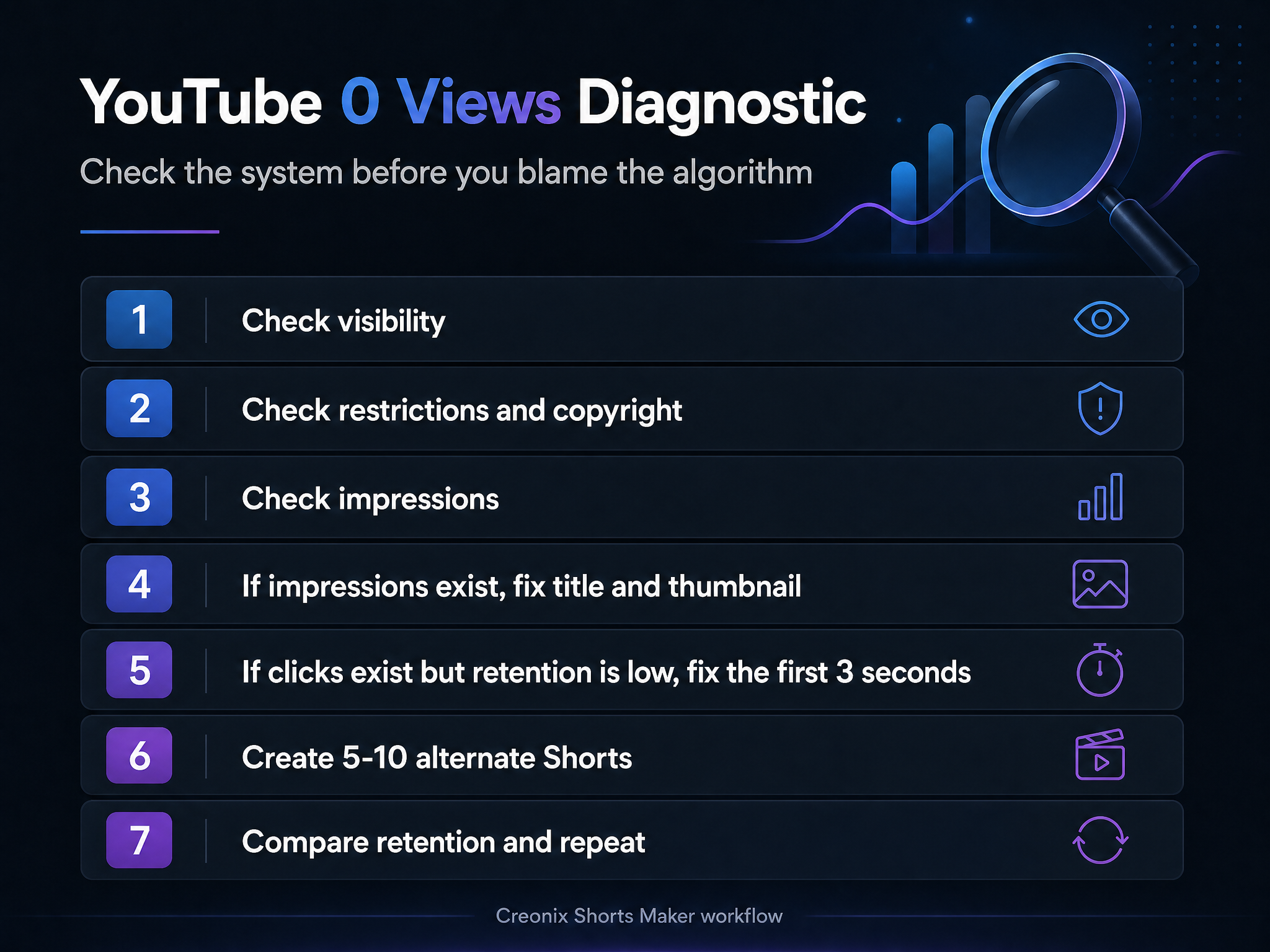
Fast rule: do not rewrite everything at once. First learn whether the video has impressions. No impressions, bad CTR, and bad retention are three different problems.
If your source is a podcast or long interview, also read the podcast content clipping service workflow.
Quick Diagnostic Table
| What you see in YouTube Studio | Likely issue | What to do first |
|---|---|---|
| 0 views and almost no impressions | Visibility, topic fit, new channel, or restriction | Check video visibility, restrictions, copyright, and Reach/Content analytics. |
| Impressions but very few views | Title/thumbnail packaging | Rewrite the title, improve the thumbnail, test a clearer promise. |
| Views start but stop quickly | Weak first 3-10 seconds | Recut the intro, remove slow setup, start with the payoff or conflict. |
| Shorts get views then freeze | Weak retention or swipe-away signals | Test alternate hooks, captions, pacing, and clip selection. |
| Multiple videos suddenly collapse | Channel/content quality, policy, or audience mismatch | Audit recent uploads, restrictions, repeated formats, and topic consistency. |
Step 1: Check Visibility and Restrictions
Before changing the creative, confirm that YouTube can actually distribute the video.
Open YouTube Studio and check:
- Visibility: Public, not Private or Unlisted.
- Processing: HD/SD processing is complete.
- Restrictions: copyright, age restriction, region block, or policy notice.
- Monetization status, if your channel is in YPP.
- Whether the upload is a Short, long-form video, live replay, or scheduled post.
If the video is restricted, fix the restriction first. A better title will not solve a copyright claim, age restriction, or blocked upload.
For channels trying to monetize, reused-content risk matters. YouTube's monetization policies allow reused content only when viewers can clearly tell there is meaningful difference between your video and the original. For AI-assisted or faceless workflows, that means your video should add original scripting, narration, commentary, editing, structure, visuals, or analysis rather than simply reuploading someone else's material.
This is the boring check that saves time. If distribution is blocked, creative tweaks are just noise.
Step 2: Read Impressions Before You Judge the Video
Views alone do not tell you enough. Impressions tell you whether YouTube showed your thumbnail to potential viewers.
Use YouTube Studio:
- Video analytics -> Reach.
- Content analytics for broader patterns.
- Check impressions and impressions click-through rate.
- Compare traffic sources: Browse, Suggested, Search, Shorts feed, External.
If impressions are near zero, your first problem is not CTR. YouTube has not meaningfully tested the video, or the topic/channel context is too weak for distribution.
If impressions exist but views are low, packaging is the first thing to fix.
Think of impressions as the moment YouTube gave your video a chance. If people saw the thumbnail/title and did not click, the video may still be useful, but the promise is not clear enough.
Step 3: Diagnose Packaging
Packaging means the title, thumbnail, topic, and first-frame promise.
For long-form videos, the title and thumbnail carry most of the click decision. For Shorts, the first frame and first second often act like the thumbnail.
Common packaging problems:
- The title describes the video but does not create a reason to click.
- The thumbnail is visually cluttered.
- The promise is too broad: "My YouTube Journey" instead of a specific outcome or conflict.
- The video topic is unclear.
- The title and thumbnail promise different things.
- The first few seconds are slow, especially in Shorts.
Better title patterns
Weak:
My Experience With YouTube
Stronger:
I Posted 30 Shorts and Only 2 Worked. Here is Why.
Weak:
Podcast Highlights Episode 12
Stronger:
The 45-Second Clip That Explained the Whole Podcast
Weak:
Finance Tips for Beginners
Stronger:
5 Money Habits That Keep Beginners Broke
The stronger examples are more specific. They tell the viewer what tension, result, or lesson they will get.
The goal is not clickbait. The goal is to make the real reason to watch obvious before the viewer scrolls away.
Step 4: Use YouTube's Title and Thumbnail Testing
YouTube now supports testing up to three title/thumbnail combinations for eligible creators. The winner is selected based on watch time. If your video has impressions but weak clicks, this is one of the safest first fixes.
Test:
- curiosity title vs direct how-to title;
- face/emotion thumbnail vs clean graphic thumbnail;
- short thumbnail text vs no text;
- problem-focused framing vs outcome-focused framing.
Do not change everything randomly every few hours. Give YouTube enough time and data to compare versions.
Step 5: Diagnose Retention
If viewers click and leave, YouTube may stop expanding distribution.
Check:
- Average view duration.
- First 30 seconds for long-form.
- Swipe-away or viewed-vs-swiped data for Shorts when available.
- Audience retention dips.
- Whether viewers leave before the video delivers what the title promised.
Common retention problems:
- Long intro.
- Branding animation before value.
- Too much context before the hook.
- Weak audio.
- Subtitles are hard to read.
- The clip starts in the middle of a thought.
- The video repeats information viewers already know.
Fix the next upload by moving the strongest line to the start.
Step 6: Do Not Delete Too Fast
Deleting and reuploading is usually not the first move.
Before deleting, ask:
- Is there a copyright or policy issue that requires replacement?
- Is the title/thumbnail fixable without reuploading?
- Is the video evergreen and searchable?
- Is this a new channel where more data is needed?
For many videos, update packaging first. For Shorts, consider making alternate cuts instead of reuploading the same file repeatedly.
Step 7: Turn One Weak Upload Into Multiple Tests
One upload is not enough data. A better workflow is to create several variations from the same source material.
For example, if a 30-minute video got no traction, create:
- 3 Shorts with different hooks;
- 2 clips focused on emotional moments;
- 2 clips focused on practical tips;
- 1 clip with a controversial question;
- 1 clip with a direct how-to angle;
- 1 clip with a story-driven angle.
Then compare:
- which hook gets views;
- which caption style holds attention;
- which topic angle earns comments;
- which length works best.
Creonix Workflow: From One Dead Video to 10 Testable Shorts
Creonix Shorts Maker is useful here because the fix is often volume plus better selection, not panic.
Suggested workflow:
- Upload or paste the source video in Shorts Maker.
- Generate candidate clips.
- Sort by the strongest hooks and clearest standalone ideas.
- Apply readable subtitles and a consistent style.
- Export multiple clips instead of betting on one upload.
- Post them as separate tests across YouTube Shorts, TikTok, and Reels.
- Track which hook/topic/format actually gets retention.
This is safer than copying someone else's content. Use your own source video, podcast, webinar, stream, tutorial, or original script. For faceless channels, use original narration, structure, and visuals so the output is meaningfully different and policy-safe.
This turns a failed upload into source material. One long video that did not work can still contain 5-10 short moments worth testing.
72-Hour Action Plan
First 15 minutes
- Confirm the video is Public.
- Check restrictions/copyright.
- Check processing status.
- Check Reach analytics.
First 24 hours
- If impressions are zero, do not overreact. Check topic, visibility, and restrictions.
- If impressions exist but views are low, rewrite title/thumbnail.
- If Shorts views freeze quickly, review the first second and subtitles.
24-72 hours
- Test title/thumbnail variants if eligible.
- Create 5-10 alternate Shorts from the same source.
- Compare hook types rather than judging the entire channel from one upload.
After 7 days
- Keep winners.
- Improve titles/thumbnails on evergreen videos.
- Use analytics to choose the next batch.
- Retire formats that repeatedly fail.
Common Mistakes
Mistake 1: Assuming 0 views means shadowban
Most low-view cases are packaging, retention, topic, or consistency problems. Treat shadowban as the last assumption, not the first.
Mistake 2: Copying viral channels directly
Copying format, voice, script, or footage can create reused-content and copyright risk. Study why a format works, then create an original version.
Mistake 3: Making only one version
Short-form growth is testing. One clip with one hook is weak data. Ten clips from one source tell you much more.
Mistake 4: Optimizing only the title
For Shorts, the opening second often matters more than the title. Fix the hook, subtitles, pacing, and first frame.
Mistake 5: Ignoring audience fit
A good video shown to the wrong audience can still fail. Keep topics consistent long enough for YouTube and viewers to understand the channel.
FAQ
Why does my YouTube video have 0 views?
The most common reasons are low or no impressions, weak title/thumbnail packaging, poor early retention, channel-topic mismatch, or restrictions such as copyright, age limits, or policy issues.
Should I delete and reupload a video with 0 views?
Usually not immediately. First check restrictions, impressions, CTR, and retention. If the video is technically fine, update the title/thumbnail or create alternate Shorts from the same source.
How long should I wait before changing a title or thumbnail?
Give the video enough time to collect data. For many creators, checking after 24-72 hours is more useful than changing packaging in the first hour.
Can AI-generated videos be monetized on YouTube?
AI-assisted content is not automatically disqualified, but originality and policy compliance matter. Avoid reused content, copied scripts, copied footage, and low-effort repetition. Add original narration, structure, editing, commentary, or analysis.
How can Creonix help if my video gets no views?
Creonix helps you turn one source video into multiple Shorts, test different hooks, add readable subtitles, and compare which clips earn retention. It does not guarantee views, but it improves the testing workflow.
Get started free